
Running agents
Two ways to run an agent
- In a plain terminal. Every worktree terminal is a real shell — run
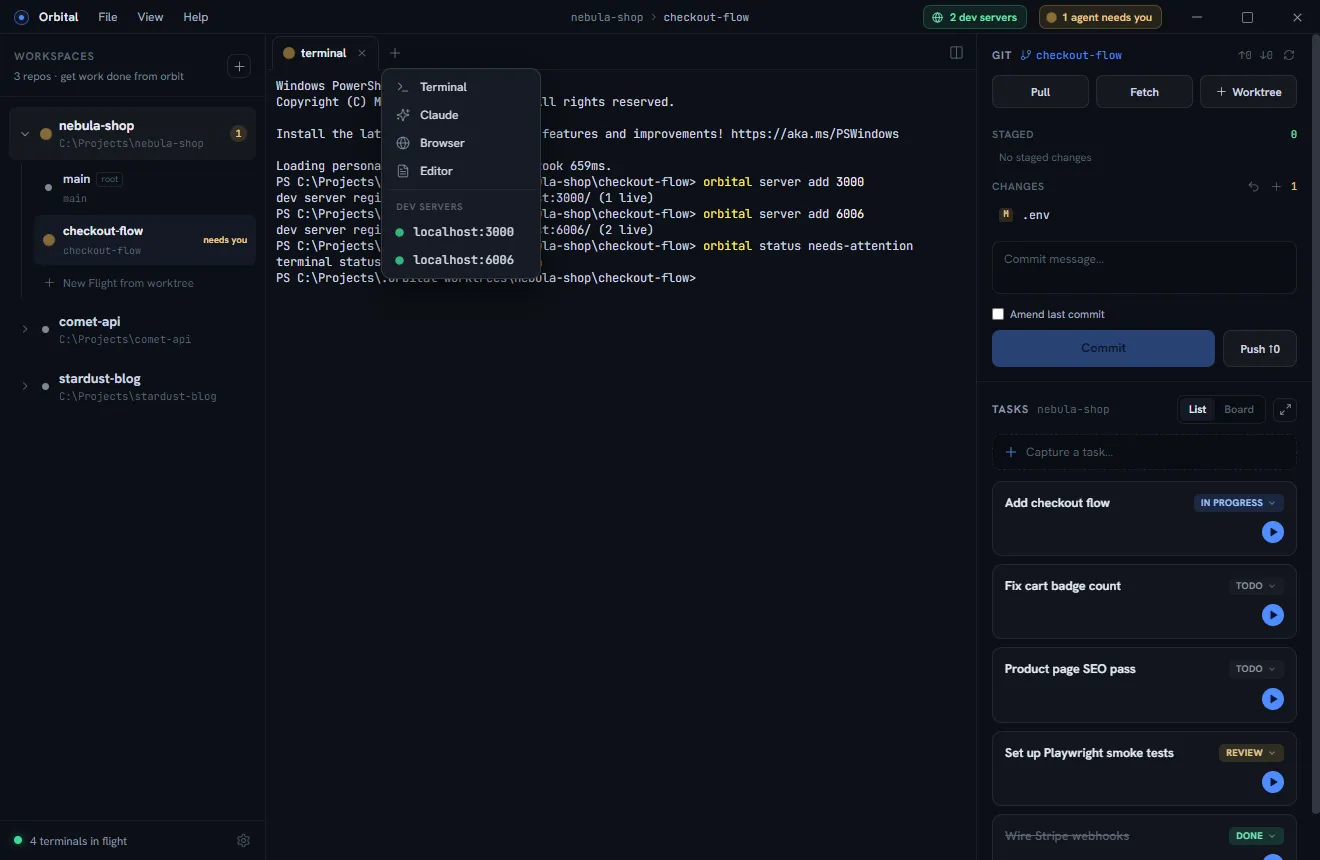
claude(or any agent CLI) like you always do. - As an agent tab. Click + in a tab strip and pick Claude. The tab boots directly into the agent, shows a status dot instead of an icon, and cleans itself up when the session ends.
Per project you can configure which provider agent tabs launch and an explicit
executable path (Settings), for setups where the agent isn’t on PATH.
Claude Code is the fully supported harness at launch; Codex support is
planned.
Either way, Orbital runs the real interactive CLI — not an API wrapper — so every feature of your harness works exactly as it does in a standalone terminal: slash commands, hooks, MCP servers, permission modes, plan mode, and your subscription’s pricing rather than metered tokens.
The briefing
Agent tabs launch with a short generated briefing: which project/worktree/branch
the agent is in, and how to use the orbital CLI — filing tasks, progressing
the task board, and registering dev servers. The briefing lives in Orbital’s own
app-data folder, never in your repo.
The briefing only reaches agent tabs, and only harnesses that accept a
system-prompt file (Claude Code today) — Orbital doesn’t generate one for the
others rather than leave a file nobody reads. A claude you run yourself in a
plain terminal is an ordinary session too. That’s what the profile-level
instructions below are for.
Sessions survive a restart
Closing Orbital (or a workspace) does not throw an agent tab’s conversation away. Each agent tab is pinned to its session id, and when the tab comes back — the app restarts, the workspace is reopened, a worktree removal is rolled back — Orbital resumes that session instead of launching a blank agent, so it carries on where it left off, mid-task and all.
- Claude is launched with
--session-id(an id Orbital mints), so this works with or without the status hooks. With the hooks installed the tab also follows a/clear, which starts a new session under a new id. A respawn runsclaude --resume <id>. - Cursor is given a chat minted with
cursor-agent create-chatand opened with--resume=<id>, on the first launch and on every respawn. - Codex assigns its own thread id, so Orbital learns it from the rollout
file Codex writes for the session (it keeps checking until one appears for
this worktree) and respawns with
codex resume <id>. Two Codex tabs launched at the same moment in the same worktree could, in principle, be matched to each other’s sessions. - Only a session the CLI still has on disk is resumed. If it has since been cleaned up, the tab starts fresh rather than sitting on a “no conversation found” error.
- A tab you open yourself is always a new conversation; close the old tab and add a new one to start over.
The orbital skill
In Settings → the orbital skill for Claude, Orbital can install a personal Agent Skill documenting the whole CLI. Claude loads it when the cockpit becomes relevant, so a hand-started session knows how to report status, file tasks, and register dev servers.
- Preview shows the exact
SKILL.mdbefore anything is written. - It lands in the Claude profile directory this workspace launches agents
against, falling back to
CLAUDE_CONFIG_DIR/~/.claude. - Orbital never overwrites a
SKILL.mdit didn’t write, and Remove deletes only its own.
The skill pre-approves the read-only and status-reporting commands so an agent can say what it’s doing without a permission prompt; creating worktrees or tabs still asks.
Codex instructions
Codex takes no briefing file, so Settings → Orbital instructions for Codex
(shown when Codex is one of the workspace’s agents) merges a short block into the
AGENTS.md of its profile directory — the file Codex loads at the start of every
session. Orbital manages only the block between its markers; the rest of the file
is yours. Because it’s always loaded, the block is kept small: the handful of
commands worth running unprompted, and a pointer to orbital help.
Cursor has no equivalent — cursor-agent accepts no instructions at launch and
reads no profile-level rules file, and Orbital won’t write .cursor/rules into
your repo. A Cursor session still has orbital on its PATH.
Claude Code status hooks
The hooks are what make statuses effortless. In Settings → Claude status hooks:
- Preview shows the exact JSON Orbital will merge before anything is
written, and the file it goes into: the
settings.jsonof the Claude profile this workspace launches agents with, which is~/.claudeunless the workspace points Claude at its own profile directory. - Install merges just those entries (idempotent); Remove strips exactly them and nothing else. A workspace on its own Claude profile needs its own install — hooks written to a profile Claude isn’t using are read by nobody.
- The hook script guards on Orbital’s environment variables, so Claude sessions started outside Orbital are completely unaffected.
Once installed, every Claude session inside Orbital reports: working on each tool use, needs-attention on permission and idle prompts, idle on stop, error on failures, done on session end.
Working the fleet
A rhythm that works well:
- Keep 3–5 worktrees active: enough parallelism to keep you busy purely with decisions and reviews, few enough that a chime always means something.
- Do your own work in the root worktree while linked worktrees grind.
- When an agent finishes, review its diff in the git panel in that worktree — the working directory is already correct.
- Have agents file follow-ups with
orbital task addinstead of expanding scope.