Status & alerts
Every terminal and agent tab carries one of five statuses:
| Status | Meaning |
|---|---|
idle | Waiting for the next instruction |
working | Actively doing something |
needs-attention | Blocked on a human — the load-bearing signal |
error | Something failed |
done | The current task is complete |
A worktree surfaces the most attention-worthy status among its terminals
(needs-attention beats error beats working …), and a project surfaces
the most attention-worthy worktree. One glance at the rail answers “who needs me?”
The three-way alert
When a worktree flips to needs-attention:
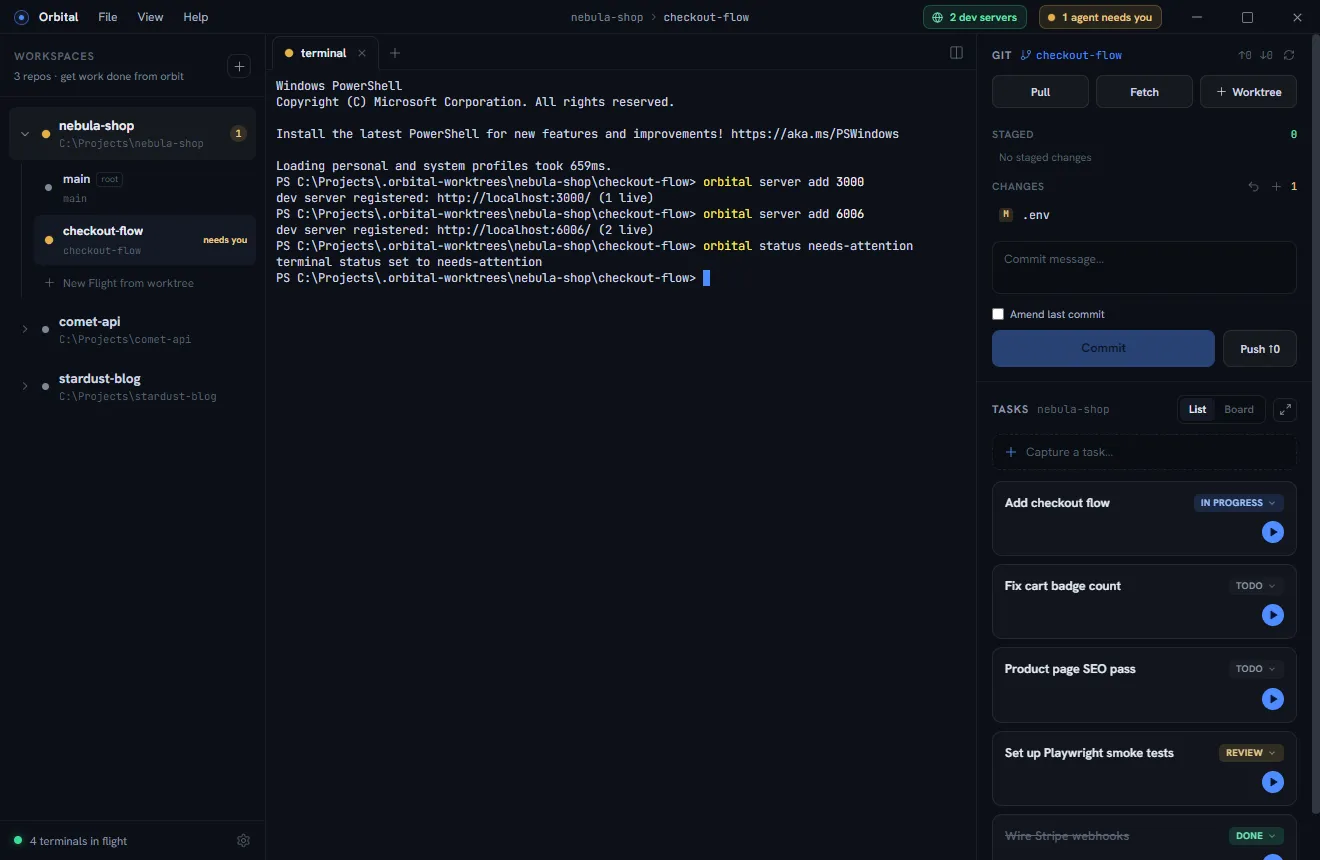
- The rail shows an amber count badge on the project and a “needs you” label on the worktree.
- The title bar shows an “N agents need you” banner.
- The Windows taskbar icon lights up — the orbiting satellite in the app icon swells and glows amber — the taskbar button flashes while Orbital is in the background, and an optional chime plays on the rising edge.
Each channel can be toggled independently in Settings.
How statuses update
- Claude Code hooks (recommended). Install once from Settings; every Claude session launched inside Orbital then reports itself automatically — working on tool use, needs-attention on permission/idle prompts, idle on stop, done on session end. See Running agents.
- Explicitly, from any agent or script:
orbital status needs-attention. - Typing clears it. When you type into an agent or terminal that is needs-attention, you have by definition responded — the status flips back immediately (to working after a permission prompt, idle otherwise) instead of waiting for the next hook event.
- A terminal whose process exits stops contributing its stale status.